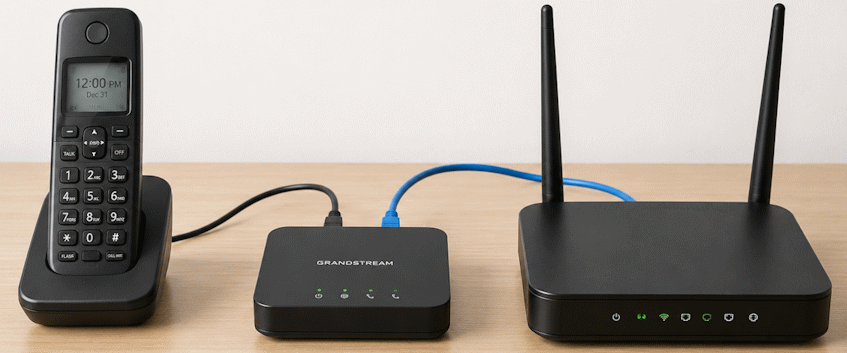
Switching your home phone to VoIP doesn’t necessarily mean replacing your phones or buying a pile of new equipment.
In many cases, you can keep the telephone you already have. You may even be able to reuse an existing VoIP adapter or, with the right setup, continue using telephone jacks throughout your home.
The equipment you need depends mostly on how you want to use your phone.
This guide explains the different options, including traditional phones and VoIP adapters, cordless phone systems, SIP phones, Wi-Fi devices, existing home wiring and equipment you may already own.
What Equipment Do You Actually Need for VoIP?
At the most basic level, you need:
- An Internet connection
- A way to connect to your VoIP provider
- Something to make and receive calls
For a traditional home-phone setup, that usually looks like:
Internet → Router → ATA Adapter → Existing Telephone
The ATA, or Analog Telephone Adapter, is the small box that allows an ordinary telephone to make calls over the Internet.
But that’s only one way to use VoIP.
| How You Want to Use VoIP | What You May Need |
|---|---|
| Keep using your existing home phone | Internet + router + ATA + telephone |
| Have phones in several rooms | ATA + cordless phone system |
| Use multiple wired phones | ATA + splitter or compatible home wiring |
| Use a dedicated Internet phone | SIP/IP phone |
| Call from a smartphone or computer | Provider-supported app or softphone |
| Keep your number without a home phone | Potentially no phone equipment at all — use forwarding or voicemail |
| Reuse equipment you already own | Compatible, unlocked SIP equipment |
Before buying anything, start by deciding how you actually want to use the phone service.
What Is an ATA Adapter?
An Analog Telephone Adapter (ATA) lets a traditional analog telephone work with a VoIP service.
Your existing phone plugs into the ATA, and the ATA connects to your Internet router. The adapter converts the voice signals from your telephone into digital data that can travel over the Internet and converts incoming VoIP calls back into something your regular telephone can use.
Popular examples include the Grandstream HT801 and HT802.
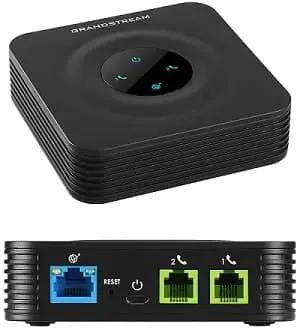
For someone replacing a traditional home-phone service while wanting to continue using an existing telephone, an ATA is often the simplest solution.
Learn more about the Grandstream HT801 & HT802 →
Can I Use My Existing Home Phone With VoIP?
Usually, yes.
That’s one of the biggest misconceptions about switching to VoIP: you don’t necessarily need a special “VoIP phone.”
A regular corded telephone or cordless phone base can usually be connected to an ATA.
That means the phone sitting on your desk or kitchen counter may not need to change at all. The technology carrying the call changes, but the telephone you pick up doesn’t necessarily have to.
How Can I Use VoIP With Phones Throughout My House?
There are several ways to do this, depending on your existing phones and home wiring.
Option 1: Use a Cordless Phone System
For most households, this is the simplest option.
Plug the cordless phone’s base station into the ATA. The additional cordless handsets communicate wirelessly with that base station.
Only the base needs to connect to the ATA, while the other handsets can be placed throughout your home.
Option 2: Use a Telephone Splitter
If you want two traditional phones connected to the same VoIP line, a basic telephone splitter may work.
The splitter connects to the ATA’s phone port and provides connections for two telephones.
There are limits to how many phones and ringers an ATA can reliably drive, so a cordless system is generally a better solution when you want numerous phones throughout the house.
Option 3: Use Your Existing Home Telephone Jacks
In some homes, an ATA can be connected to the home’s existing telephone wiring so that traditional wall jacks in different rooms continue to work.
This can make VoIP behave much more like the landline setup you’re replacing.
There is one very important requirement: the home’s internal telephone wiring must first be properly disconnected and isolated from the former telephone provider’s outside line.
An ATA should not simply be connected to home telephone wiring that is still connected to the telephone company’s network.
It may be possible. An ATA can sometimes feed VoIP service into your home’s existing telephone wiring so phones in different rooms continue working. The home wiring must first be properly isolated from the former telephone provider’s outside line. If you’re not certain how the wiring is connected, don’t simply plug the ATA into a wall jack.
If you don’t want to deal with existing telephone wiring, a cordless phone system is usually the simpler option.
Does a Two-Port ATA Mean I Can Connect Two Phones?
Not necessarily, and this is an easy thing to misunderstand.
For example, the Grandstream HT802 has two telephone ports, while the HT801 has one.
But the second port on an HT802 is generally intended to support another provisioned VoIP line or account. Having two ports does not automatically mean you can plug two telephones into the adapter and have both ports use the same telephone number.
If your goal is simply to have several phones ring when somebody calls one number, a cordless phone system, telephone splitter or properly configured home telephone wiring may be a better solution.
Does a VoIP Adapter Need to Be Connected by Ethernet?
It depends on the equipment.
Many common ATAs, including the Grandstream HT801 and HT802, connect directly to your router using an Ethernet cable.
That can matter if your Internet router is in the basement while you want your telephone upstairs.
Some SIP phones and other VoIP devices support Wi-Fi, while traditional Ethernet-only ATAs do not.
A cordless phone system often solves this neatly: place the ATA and cordless base near the Internet router, then put the cordless handsets wherever you need them.
Can I Use My Own VoIP Equipment?
In many cases, yes.
VoIP commonly uses a communications standard called SIP (Session Initiation Protocol). Because SIP is widely supported, you aren’t necessarily tied to equipment sold by your VoIP provider.
NetJOI works with most standard, unlocked SIP-compatible hardware, which can include:
- Analog Telephone Adapters (ATAs)
- SIP/IP desk phones
- SIP-capable cordless phones
- Compatible SIP phone systems and other SIP devices
If you already own equipment, check the manufacturer and exact model before buying something new.
And if you have a device you simply think of as your old “phone box,” don’t assume that a telephone jack automatically makes it a SIP ATA. Some devices are designed for cellular home-phone service or for one particular provider.
If you’re considering NetJOI and already have equipment, send us the make and model number and we can help you determine whether it’s likely to be compatible.
Can a VoIP Adapter Be Locked to a Provider?
Yes.
An ATA can be technically SIP-compatible while your particular device is still difficult or impossible to use with another provider.
Some phone companies supply devices that are password-protected, remotely provisioned or configured specifically for their service.
If that sounds familiar, it’s similar to how mobile phones used to be commonly locked to the wireless carrier that supplied them. The hardware itself could support another network, but the carrier-controlled configuration prevented the customer from simply moving it.
Wireless-device unlocking rules and practices don’t necessarily apply to VoIP adapters in the same way, so you shouldn’t assume an ATA supplied by your previous VoIP company can automatically be reused elsewhere.
SIP-compatible doesn’t always mean usable. The model itself may support SIP while your particular adapter is password-protected, remotely managed or tied to the provider that originally supplied it. Check the device itself, not just the model specifications.
How Can I Tell If My Existing ATA Is Locked?
Start by finding the manufacturer and exact model number, usually printed on a label underneath the device.
Then determine whether:
- the model supports SIP;
- you can access the device’s administration interface;
- you have access to its SIP or account settings;
- the equipment was purchased by you or supplied by your previous provider; and
- the previous provider allows the equipment to be configured for another service.
A factory reset isn’t necessarily the solution. Provider-managed equipment may still require credentials you don’t have or may retrieve its previous configuration again.
Before buying a replacement, ask your new provider to check the model you already own.
Do I Need a Special VoIP Phone?
No.
If you already own a traditional telephone and like it, an ATA is usually all you need to connect that phone to VoIP.
A dedicated SIP/IP phone has VoIP capability built directly into the telephone, so it doesn’t require a separate ATA.
An IP phone can make sense if you’re buying new equipment anyway, but there’s generally no reason to throw away a perfectly good traditional home phone simply because you’re switching to VoIP.
Do I Need a Computer for VoIP?
No.
A typical home VoIP setup doesn’t require a computer to remain turned on.
Your ATA or SIP phone connects through your Internet network independently.
A computer or smartphone is only required if you’ve chosen to make calls using a softphone or provider app instead of physical telephone equipment.
Does VoIP Work With Any Internet Provider?
Generally, yes.
Your VoIP provider and Internet provider don’t normally have to be the same company.
For example, NetJOI Digital Home Phone works with any suitable Internet provider in Canada. You can keep your current Internet service and change only your phone provider.
The important requirement is a sufficiently stable Internet connection rather than whose name appears on the Internet bill.
How Fast Does My Internet Need to Be for VoIP?
Not especially fast.
Voice calls use relatively little bandwidth compared with video streaming, gaming or large downloads. Practically any modern broadband Internet connection has enough raw speed for a normal VoIP call.
Connection stability matters much more than buying an extremely fast Internet plan.
A stable 50 Mbps Internet connection can provide excellent phone service. A 1 Gbps connection that regularly drops or experiences connection problems won’t magically produce better VoIP calls just because its advertised speed is higher.
When using a traditional ATA, the wired Ethernet connection between the ATA and your router also removes Wi-Fi quality from that part of the connection.
What Happens If the Internet or Power Goes Out?
VoIP relies on your Internet connection and powered networking equipment.
If your Internet connection goes down, your VoIP phone will normally go offline with it. A power outage can also take your modem, router, ATA and cordless telephone base offline.
A small UPS (Uninterruptible Power Supply) can provide temporary backup power during shorter outages.
For a typical home setup with a modem, router and ATA, a small 400–600 VA UPS is a reasonable starting point. Units in this range commonly sell for roughly $60–$120 CAD, depending on brand, battery capacity and features.
The ATA itself uses very little power, so your modem and router will usually determine how long the backup lasts.
Most importantly, don’t put only the ATA on backup power. Your modem and router also need to stay powered for VoIP service to continue working.
A UPS can’t guarantee service during an outage. If your Internet provider’s network is also unavailable, your VoIP service won’t work even though your equipment at home remains powered.
Is VoIP Secure?
VoIP and traditional landlines use different technologies, so their security characteristics aren’t exactly the same.
Traditional copper landlines use a dedicated physical telephone connection, while VoIP carries calls over Internet and provider networks. Because of that, VoIP providers need to protect against risks such as unauthorized account access, calling fraud and malicious network activity.
With NetJOI, the underlying voice platform includes protections designed to help detect and prevent unauthorized registrations, toll fraud, voicemail abuse and malicious traffic. Customer portal access is password protected, and the supporting platform and data are hosted in Canada.
For customers with specific security or privacy requirements, such as encrypted voice communications, it’s worth confirming those requirements with the provider before switching.
What About Fax Machines, Security Systems and Medical Alert Devices?
A regular telephone isn’t the only device that may use a traditional phone jack.
Older homes and businesses may also have equipment such as:
- fax machines;
- security and alarm systems;
- medical alert or emergency-monitoring devices;
- intercom and entry systems;
- dial-up modems; and
- other equipment containing an analog telephone dialler.
Don’t assume that a device will work over VoIP simply because it has a telephone plug.
Fax Machines
Some ATAs, including Grandstream devices used for VoIP service, support technologies designed to improve fax transmission over IP networks.
Fax over VoIP can still be more sensitive to equipment configuration and network conditions than an ordinary voice call, and compatibility isn’t guaranteed for every combination of provider, ATA and fax machine.
NetJOI officially supports voice service; fax functionality should be confirmed before relying on it for important communications.
Security and Alarm Systems
If your security or alarm system uses a telephone line to communicate with a monitoring centre, contact your alarm company before moving that line to VoIP.
Some older systems may work through an ATA, while others may require configuration changes or may not be suitable for VoIP at all. Many newer alarm systems use Internet or cellular connectivity instead of a traditional phone line.
Medical Alert and Emergency-Monitoring Devices
Be particularly careful with medical-alert or emergency-monitoring equipment.
Do not move a critical medical or emergency device to VoIP without confirming compatibility with the company that supplies or monitors the equipment.
These systems may have specific connectivity and backup-power requirements, especially because they may need to operate during an Internet or power outage.
Regular telephones usually work very well through an ATA. Fax machines, security systems, medical-alert devices and other equipment with built-in telephone diallers are different. Check with the equipment manufacturer or monitoring provider before moving a critical device from traditional phone service to VoIP.
What Equipment Does NetJOI Use?
For customers who want to continue using a regular home telephone, NetJOI commonly uses Grandstream Analog Telephone Adapters.
Equipment purchased through NetJOI arrives pre-configured, so customers normally don’t need to enter SIP server addresses, usernames, passwords or other technical settings themselves.
Setup is typically:
Router → ATA → Existing Telephone
Connect the ATA to your router, connect your telephone, plug in the power and let the device register with the service.
You are not required to buy your VoIP equipment from NetJOI. Most standard unlocked SIP-compatible equipment can be used, although third-party equipment may require manual configuration and troubleshooting can vary depending on the device.
Grandstream HT801 & HT802 Setup and Buyer’s Guide →
What If I Want to Keep My Number but Don’t Want a Home Phone?
Then you may not need telephone equipment at all.
If the number matters more than having a physical phone, you can transfer the number to a service that forwards incoming calls elsewhere or sends them to voicemail.
For example, calls to an old home number could be forwarded to your cellphone while family, friends and other contacts continue calling the number they’ve always known.
If your real goal is keeping a longtime telephone number, you may not need an ATA or physical home phone at all. Number forwarding can let you keep the number and send incoming calls somewhere else.
Frequently Asked Questions About VoIP Equipment
Can I use my old telephone with VoIP?
Usually, yes. A standard analog telephone can normally be connected to VoIP using an ATA.
Can I use cordless phones?
Yes. Connect the cordless base station to the ATA. Additional cordless handsets communicate with the base and can be placed throughout your home.
Can I use the telephone jacks already in my house?
Potentially. Your home’s internal telephone wiring must first be properly isolated from the former telephone provider’s outside line before an ATA is connected to the house wiring.
Can I use an ATA from another VoIP provider?
Possibly. The adapter needs to be SIP-compatible, configurable and not locked or controlled by the previous provider.
Can I use my own SIP phone with NetJOI?
Most standard unlocked SIP-compatible hardware can be used. Check the specific manufacturer and model before purchasing equipment or assuming that equipment from another provider can be reused.
Does an HT802 let me connect two phones to the same number?
Not simply because it has two telephone ports. Its FXS ports can be provisioned separately. If you want several phones using one line, a cordless phone system, splitter or compatible home wiring may be a better solution.
Do I need a computer?
No. An ATA or SIP phone operates independently of your computer.
Can I make VoIP calls over Wi-Fi?
Some SIP phones, apps and other VoIP devices support Wi-Fi. Many traditional ATAs connect directly to your router using Ethernet, so check the specific device before deciding where you’ll place it.
Do I need NetJOI Internet to use NetJOI Phone?
No. NetJOI Digital Home Phone works with any suitable Internet provider in Canada.
Can I keep my existing telephone number?
In most cases, eligible telephone numbers can be transferred to a new VoIP provider. Keep your existing phone service active until the number transfer has completed.
The Bottom Line
VoIP doesn’t require complicated equipment.
For many households, the entire setup is simply:
Internet + Router + ATA + the Phone You Already Own.
But you have more options than that.
You can use a cordless phone system, compatible SIP phone, your own unlocked ATA and, in some circumstances, even the existing telephone wiring throughout your home.
And if all you really want is to keep a longtime telephone number, you may not need a physical phone at all.
Before buying new equipment, figure out what you already own and how you want to use your phone service. You may need considerably less new hardware than you think.
Grandstream HT801 & HT802 Setup and Buyer’s Guide →
Best VoIP Home Phone Providers in Canada →