
If you’re switching your home phone to VoIP and want to keep using a regular telephone, there’s a good chance you’ll come across the Grandstream HT801 and HT802.
Both are small Analog Telephone Adapters (ATAs) that connect a traditional telephone to an Internet-based phone service. They’re widely used, relatively inexpensive and designed to do one job well.
So what’s the difference?
The short answer is simple:
The HT801 is designed for one phone line. The HT802 can support two separately configured phone lines.
For most homes with one phone number, the HT801 is all you need. But there’s a little more worth knowing before you buy, including whether you need an ATA at all.
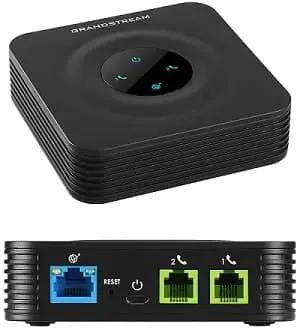
HT801 vs HT802 at a Glance
| Feature | Grandstream HT801 V2 | Grandstream HT802 V2 |
|---|---|---|
| Phone ports | 1 FXS port | 2 FXS ports |
| Best for | One VoIP phone line | Up to two VoIP phone lines |
| Existing analog phones | Yes | Yes |
| SIP compatible | Yes | Yes |
| Ethernet connection | Yes | Yes |
| Current generation | V2 | V2 |
| NetJOI compatible | Yes | Yes |
| NetJOI recommended | Yes | Yes |
For a typical home replacing one traditional phone line, the HT801 V2 is usually the better choice.
The HT802 V2 makes sense if you need two independently configured phone ports or want the flexibility to add another VoIP line later.
What Does an ATA Actually Do?
An ATA, or Analog Telephone Adapter, lets an ordinary telephone communicate with a VoIP service.
Your existing phone plugs into the ATA. The ATA connects to your Internet router using Ethernet, and the adapter converts the phone’s analog signals into the digital traffic used by your VoIP provider.
That means you don’t necessarily need to replace the telephones already in your home.
A regular corded phone or the base station from a cordless phone system can usually plug directly into the ATA.
If you want a broader explanation covering cordless phones, home telephone wiring, fax machines, alarm systems, medical-alert devices, UPS battery backup and other equipment, see our complete guide to equipment needed for VoIP.
The Biggest Difference: One Port vs Two
The physical difference between the HT801 and HT802 is easy to spot.
The HT801 has one telephone port.
The HT802 has two telephone ports.
But there’s an important catch:
Two ports don’t automatically mean two jacks for the same telephone line.
The second port on an HT802 is normally provisioned as another VoIP line. Simply plugging another telephone into Port 2 doesn’t automatically make both phones ring using the number configured on Port 1.
If what you really want is several phones around your home using the same phone number, you often don’t need an HT802.
A cordless telephone system is usually the simplest solution: connect its base station to the HT801 or Port 1 of an HT802, then use the additional cordless handsets throughout your home.
Depending on your home’s existing telephone wiring and configuration, there are other ways to distribute a VoIP line to multiple jacks. We cover those options in our broader VoIP Equipment Guide.
Are the HT801 and HT802 Still Current?
Yes, and this is worth checking before buying any VoIP hardware.
Grandstream now offers updated HT801 V2 and HT802 V2 versions of these adapters. They’re current products, and Grandstream continues to publish firmware for the HT8xx V2 family.
Grandstream’s published compliance information also currently extends into late 2029 or beyond for the V2 models.
That doesn’t guarantee exactly how many years any piece of hardware will remain on sale, but it does mean you’re not deliberately buying into an already-abandoned product line.
If you’re purchasing a new adapter today, we’d choose the current V2 model rather than deliberately seeking out an older HT801 or HT802.
Why Are the HT801 and HT802 So Popular?
An ATA doesn’t need to be exciting.
In fact, that’s part of the appeal.
The HT801 and HT802 are compact devices designed to sit beside your modem or router and operate continuously. They support standard SIP-based VoIP services and common voice codecs, and they don’t add unnecessary screens, Wi-Fi systems or other features most residential users don’t need.
They’re also made by Grandstream, a long-established manufacturer of VoIP phones, adapters, gateways and other communications equipment.
For a home-phone replacement, that combination of simplicity, broad SIP support, current firmware and relatively low cost makes the HT801/802 family difficult to argue with.
HT801 and HT802 vs Other Popular VoIP Adapters
Grandstream isn’t the only company to make ATAs, and you don’t necessarily need an HT801 or HT802 to use VoIP.
Here are some other devices you may encounter:
| Adapter | Phone Ports | Status / Position | Who Might Consider It |
|---|---|---|---|
| Grandstream HT801 V2 | 1 | Current | Most single-line home users |
| Grandstream HT802 V2 | 2 | Current | Users needing two provisioned ports |
| Grandstream HT812 V2 | 2 | Current | Users wanting additional networking capabilities |
| Cisco ATA191 / ATA192 | 2 | Newer Cisco ATA generation | Cisco environments or compatible VoIP services |
| Cisco SPA112 / SPA122 | 2 | Discontinued | People who already own one |
The Cisco SPA112 and SPA122 deserve particular mention because there are still plenty of them around.
They were extremely popular SIP adapters, but Cisco stopped selling the SPA112/SPA122 family in 2020 and official support ended in 2025. Cisco identified the ATA191 and ATA192 as replacement products.
That doesn’t mean an existing SPA112 or SPA122 suddenly stops working.
If you already own an unlocked ATA that’s working properly with a SIP service, there may be no reason to replace it simply because it’s older.
But if you’re buying new hardware today, we’d generally favour a current, actively supported model.
Does NetJOI Require a Grandstream Adapter?
No.
NetJOI works with most standard SIP-compatible ATAs and VoIP devices.
We recommend the Grandstream HT801 V2 and HT802 V2 because they’re reliable, current, widely used and straightforward for us to support, not because NetJOI requires proprietary hardware.
If you already have another SIP-compatible device, you may be able to use it instead.
That could include another Grandstream ATA, certain Cisco devices, SIP desk phones and other standard SIP hardware.
There is one important thing to check first.
Watch for Provider-Locked VoIP Equipment
A device can be SIP compatible and still not be practical to use with another provider.
Some VoIP companies supply equipment that is password-protected, remotely managed or configured so the customer can’t easily change the SIP account information.
It’s similar to the way mobile phones were historically sold locked to a particular carrier.
The important difference is that Canada’s mobile-device unlocking rules don’t mean every ATA or VoIP phone must be unlocked for use with another VoIP provider.
So if you’re considering a used ATA, particularly one originally supplied by another telephone company, don’t check only whether the model supports SIP.
Check whether that particular device can actually be configured for another SIP provider.
Why Buy a Pre-Configured ATA?
You can absolutely purchase your own ATA.
But there’s a difference between buying compatible hardware and buying hardware that’s already configured for your telephone service.
A third-party ATA may require you to access its administration interface, enter the appropriate SIP settings and credentials, make configuration changes and troubleshoot the device if it doesn’t register correctly.
ATAs purchased directly from NetJOI are pre-configured for your NetJOI phone service.
For most customers, setup is then essentially:
- Connect the ATA to your router with Ethernet.
- Connect your telephone or cordless base station.
- Connect power.
- Allow the adapter to start and register.
That’s the main reason we offer the Grandstream adapters ourselves: not because you have to buy our hardware, but because some customers would rather receive something that’s already set up.
Do You Even Need an ATA?
Maybe not.
An ATA makes sense when you want to continue using a physical telephone to make and receive calls through your VoIP service.
But sometimes the telephone isn’t actually what people care about.
It’s the phone number.
Perhaps you’ve had the same home number for 20 or 30 years. Friends and family know it. Businesses have it. You don’t want to lose it, but you rarely pick up the home phone anymore.
In that situation, you may not need an ATA or a home telephone at all.
You can instead transfer the number to a service that lets you forward incoming calls to another number, such as your cellphone.
With NetJOI’s Keep My Number option, you can keep your existing number and manage what happens when someone calls, forward calls to another number, send them to voicemail, or change your settings through the NetJOI phone portal.
No phone adapter. No home phone required.
NetJOI Keep My Number is $9.99/month.
Which VoIP Adapter Should You Buy?
For most people, this decision doesn’t need to be complicated.
Choose the Grandstream HT801 V2 if you have one VoIP phone line and want to connect a regular telephone or cordless phone system.
Choose the Grandstream HT802 V2 if you need two independently configured phone ports or expect to use two VoIP lines.
Keep the ATA you already own if it’s SIP-compatible, configurable and works properly. There’s no benefit in replacing functioning equipment just to have the model we normally recommend.
Consider another current SIP ATA if it has a particular feature you need. NetJOI doesn’t require you to use Grandstream hardware.
And skip the ATA altogether if what you really want is to preserve your existing number and forward incoming calls somewhere else.
That’s ultimately why we recommend the HT801 V2 and HT802 V2: they’re current, straightforward, proven SIP adapters that do what most residential VoIP customers need without unnecessary complexity.
FAQs
Can I use my existing telephone with an HT801 or HT802?
Yes. Both adapters are designed to connect regular analog telephones to a VoIP service. A cordless phone base station can also normally be connected to the ATA.
Can I use two phones with an HT801?
Yes. If you want multiple handsets using the same line, one of the easiest options is a cordless phone system with one base station and several handsets.
The number of FXS ports on an ATA should not be confused with the number of physical handsets you can have around your home.
Does the HT802 give me two phone numbers?
Not automatically. It provides two FXS phone ports that can be separately provisioned. Whether you have one or two telephone numbers depends on your VoIP service and configuration.
Is the HT802 better than the HT801?
Not necessarily.
It has an additional phone port, but if you only have one VoIP line, that may provide no practical advantage. For many residential customers, the simpler HT801 V2 is all that’s required.
Can I use an old Cisco SPA122 with NetJOI?
Potentially. NetJOI supports standard SIP-compatible hardware, but an older device must still be configurable and not locked to another provider.
Because the SPA122 is now discontinued, we generally wouldn’t recommend deliberately buying one instead of a current ATA unless there’s a good reason.
Can I buy my own ATA and use it with NetJOI?
Yes. You don’t have to purchase your ATA from NetJOI.
Just make sure the device is SIP-compatible, configurable and not locked to another provider. Equipment purchased from NetJOI comes pre-configured, which removes most of the manual setup.
Do I need an ATA if I only want to keep my phone number?
No. If you don’t need a physical home phone, a number-forwarding service may be a better fit.
Final Thoughts
The HT801 V2 and HT802 V2 aren’t complicated devices, and that’s precisely the point.
If you’re replacing a single traditional home-phone line, the HT801 V2 is likely all you need. If you genuinely need two separately configured phone ports, step up to the HT802 V2.
Already have compatible SIP hardware? Try to use it rather than buying equipment unnecessarily.
And if you’ve realized that what you really want to keep is your number rather than your home phone, you may not need an ATA in the first place.
Want to understand how ATAs work with existing phones, house wiring, fax machines, alarms, medical-alert devices and battery backup? See our complete VoIP Equipment Guide.
Ready to switch? Explore NetJOI Home Phone options.