Most people use cable Internet for years without ever hearing the word DOCSIS. That is perfectly normal. It is not an app, an Internet plan, or another item hiding on your monthly bill.
DOCSIS is the technology that allows Internet service to travel over the coaxial cable originally installed in homes for cable television. It helps the cable network outside your home communicate with the modem inside it.
You usually do not need to care which DOCSIS version your modem uses. That changes when you switch Internet providers, replace older equipment, or find a modem in the closet and wonder whether it still has some life left in it.
A modem can power on, display all the right lights, and have worked perfectly yesterday, yet still be ineligible for a new Internet activation.
So, what exactly is DOCSIS 3.1, and can you keep using a modem you already own?
The Main Things to Know
- DOCSIS is the communications standard used by cable networks and cable modems.
- DOCSIS 3.1 is a newer generation than DOCSIS 3.0.
- NetJOI requires an approved DOCSIS 3.1 modem for new cable Internet activations.
- A modem supporting DOCSIS 3.1 is not automatically compatible with every cable network.
- Customers using an approved modem they already own save $5 per month with NetJOI.
Visit our Keep Your Modem page to review compatible models and learn how to save $5 per month with approved equipment.
What Is DOCSIS 3.1?
DOCSIS stands for Data Over Cable Service Interface Specification, which is a very official-sounding name for the standard that carries Internet data over a cable network.
A useful comparison is 4G and 5G mobile service.
DOCSIS is to cable Internet what 4G or 5G is to a mobile network. It is the communications technology used by the network and the customer’s equipment to exchange data.
DOCSIS 3.0 is an older generation, while DOCSIS 3.1 is the newer standard used across modern cable networks. The comparison is not perfect, but the basic idea is similar: each new generation is designed to move more data and use the available network capacity more efficiently.
There is another useful part to the comparison. A phone being 5G-capable does not mean it will automatically work with every mobile carrier. The phone model still has to be supported by that carrier.
The same is true of cable modems. A modem may support DOCSIS 3.1 but still need approval for the cable network serving your address.
It is a newer generation of communications technology. However, just as not every 5G phone is accepted by every mobile carrier, not every DOCSIS 3.1 modem is approved on every cable network.
A Short History of DOCSIS
Cable networks were not originally built for Internet access. They were designed to carry television programming into homes through coaxial cable.
When home Internet began growing, the cable industry faced an interesting challenge: could those same television cables carry broadband data?
DOCSIS was developed to create a common technical standard for doing exactly that. Instead of replacing the cable running into every home, cable companies could upgrade their networks and use the existing coaxial connection for Internet service.
Over time, newer DOCSIS generations added more capacity and supported faster services:
| DOCSIS generation | What changed |
|---|---|
| DOCSIS 1.x | Helped establish standardized Internet service over cable networks |
| DOCSIS 2.0 | Improved upstream performance |
| DOCSIS 3.0 | Combined multiple channels to support much faster service |
| DOCSIS 3.1 | Uses available cable capacity more efficiently and supports modern gigabit-class services |
| DOCSIS 4.0 | The next generation, designed to expand capacity and improve upload performance further |
CableLabs introduced the DOCSIS 3.1 specifications in 2013, and the industry moved from specification development into equipment testing and large-scale deployment over the following years. DOCSIS 3.1 has since become a core technology across modern hybrid fibre-coaxial cable networks. (CableLabs)
The important part for customers is that cable Internet has continued evolving without requiring every home to receive a completely new physical connection.
How Cable Internet Reaches Your Devices
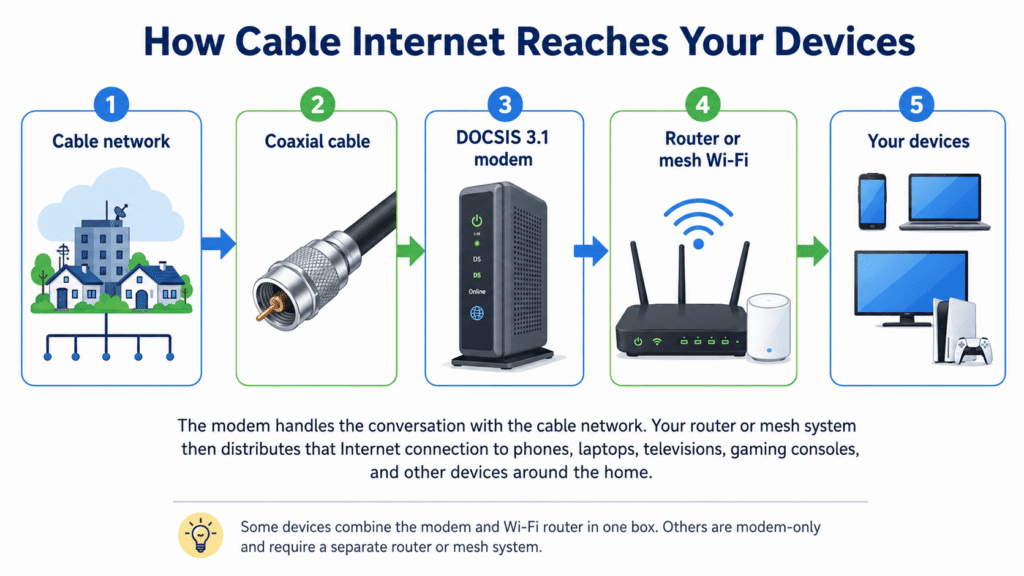
The modem communicates with the cable network. Your router or mesh system then distributes that Internet connection to phones, laptops, televisions, gaming consoles, and other devices around the home.
Some devices combine the modem and Wi-Fi router in one box, while modem-only devices require a separate router or mesh system.
DOCSIS 3.0 vs. DOCSIS 3.1
DOCSIS 3.0 was widely used for many years, and some customers may still have older DOCSIS 3.0 modems operating on existing accounts.
That does not mean those modems can be used for a new activation.
| What matters to customers | DOCSIS 3.0 | DOCSIS 3.1 |
|---|---|---|
| Technology generation | Older standard | Newer standard |
| May still work on an existing service | Yes | Yes |
| Accepted for new NetJOI activations | No | Yes, when the model is approved |
| Better suited to modern high-speed plans | Increasingly limited | Yes |
| Automatically works on every cable network | No | No |
| Worth purchasing today | Generally no | Only after confirming the model |
An older modem may still power on and look completely healthy. That simply means the hardware works; it does not mean the cable network will accept it for a new account.
This is similar to an older mobile phone that still charges and turns on but can no longer be activated by a carrier.
A DOCSIS 3.0 modem may remain online on an existing account while no longer being accepted for a new Internet activation.
Why Doesn’t Every DOCSIS 3.1 Modem Work?
Seeing DOCSIS 3.1 on the modem is a good start, but it is not the entire compatibility test.
Think of DOCSIS 3.1 as getting the modem through the first door. Approval of the exact model gets it through the second.
Cable networks test and approve specific modem models because the device has to work properly with their equipment, software, network configuration, and service plans. Canadian cable providers are permitted to require tested and compatible modem models for independent Internet providers using their networks. (CRTC)
Compatibility may depend on:
- The manufacturer and exact model
- The cable network serving the address
- The selected Internet plan
- The modem’s hardware or firmware version
- Whether the modem is still registered to another account
The modem supports the correct generation of cable technology, but the exact model must still be approved for the network serving your address.
NetJOI checks the make, model, service address, serial number, and cable MAC address before activation. The cable MAC address may appear on the equipment label as CM MAC, HFC MAC, or Cable Modem MAC.
The sticker on the bottom of a modem is not especially exciting reading, but it tells us much more than the logo on the front.
Is a Modem the Same as a Wi-Fi Router?
Sometimes both functions are combined, but they are not technically the same thing.
A modem connects your home to the cable network. A router takes that connection and distributes it through Wi-Fi or Ethernet. A mesh system performs the router’s job while using multiple Wi-Fi points to improve coverage around the home.
| Equipment type | Connects to the cable network | Provides Wi-Fi |
|---|---|---|
| Modem only | Yes | No |
| Wi-Fi router | No | Yes |
| Mesh Wi-Fi system | No | Yes |
| Modem-router gateway | Yes | Yes |
A modem-only device is often a good fit for customers who already own a router or mesh system they like. A combined gateway can be simpler for customers who prefer one box and fewer cables.
Can You Reuse Your Modem With NetJOI?
You may be able to reuse a modem from a previous Internet provider when the exact model is approved for your address and has been removed from the previous account. Reusing a modem is only one part of a smooth provider change. Our guide to switching Internet providers in Canada explains how to plan activation, equipment delivery, and cancellation without creating unnecessary downtime.
If the equipment was rented or provided on loan, it normally needs to be returned. If you purchased it, there is a better chance it can be reused.
During NetJOI checkout, select Use Your Own Compatible Modem and provide the requested modem information. We will review compatibility before activation.
Customers using an approved compatible modem save $5 per month:
| Time using your modem | Total savings |
|---|---|
| One year | $60 |
| Two years | $120 |
| Three years | $180 |
| Each additional year | Another $60 |
The $5 monthly discount does not expire. It continues for as long as you use approved compatible equipment with your NetJOI Internet service.
If your modem is approved, you can keep using it with NetJOI and save $5/month. See compatible modems →
What About Buying a Used Modem?
A used DOCSIS 3.1 modem may work, but check the exact model before handing over any money.
Marketplace listings often claim that a modem “works with Rogers,” “works with Shaw,” or “works with any cable provider.” The seller may be completely sincere, but cable networks make the final compatibility decision.
Also check that the modem has been removed from the previous account and includes the correct power adapter. The cheapest modem is not much of a bargain if the network refuses to activate it.
Frequently Asked Questions
Is DOCSIS 3.1 the same as fibre Internet?
No. DOCSIS carries Internet over a coaxial cable network, while fibre-to-the-home uses fibre-optic cable all the way into the customer’s premises.
Both technologies can deliver fast home Internet, but they use different infrastructure. Our Cable Internet vs. FTTN Internet guide explains how the major connection types compare.
Can I use a DOCSIS 3.0 modem with NetJOI?
No. NetJOI requires an approved DOCSIS 3.1 modem for new cable Internet activations.
Does DOCSIS 3.1 include Wi-Fi?
Not by itself. DOCSIS describes the cable connection between the network and modem. Some DOCSIS 3.1 gateways include Wi-Fi, while modem-only models require a separate router or mesh system.
Can I buy any DOCSIS 3.1 modem online?
You can buy one, but not every DOCSIS 3.1 model will be approved for your address. Check the exact model before purchasing.
How much can I save using my own modem?
NetJOI customers using approved compatible equipment save $5 per month, which equals $60 per year or $180 over three years.
Final Thoughts
DOCSIS 3.1 is the modern communications standard that allows cable networks and cable modems to exchange data. Like the move from 4G to 5G, it represents a newer generation designed to handle more capacity and support faster service.
However, DOCSIS 3.1 on the label does not guarantee that every provider will accept the modem. The exact model still has to be approved for the network serving your address.
If you already have a compatible modem, there may be no reason to replace equipment that still works. Keeping it can make switching simpler, reduce unnecessary equipment waste, and save you $5 every month with NetJOI.
See compatible modems and learn how to keep yours →